
If you have licensed the "Transaction cost calculation" process, you will find a corresponding entry in the process drop-down list on the "Overview" tab.
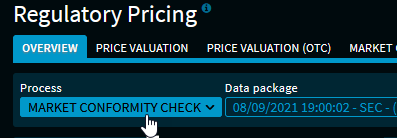
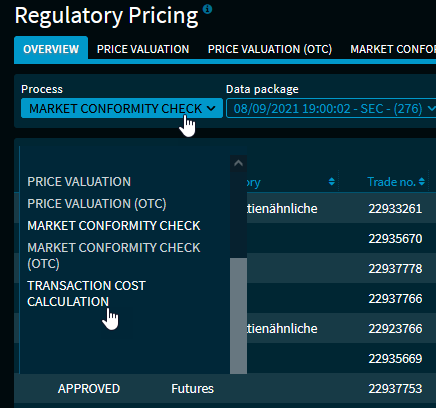
Select it to see the list of results for the transaction cost calculation.

By default, the results list shows the following columns in detail for the "Transaction cost calculation" process:
|
Column |
Description |
|---|---|
|
Result |
The result of the entry, for example "Open" or "Approved". |
|
Client ID |
The individual client IDs of the instrument. [Client data] |
|
ISIN |
The ISIN of the instrument. |
|
Infront ID |
The unique Infront ID of the instrument. |
|
Short name |
The security name (short name) of the instrument. |
|
Currency |
The currency of the instrument. [Client data] |
|
Product category ID TCC |
The product category ID of the transaction costs. |
|
Date order task |
The date and time according to order placement. [Client data] |
|
Net execution price |
The net execution price of the order. [Client data] |
|
Date order execution |
The date and time according to the order execution. [Client data] |
|
Costs Full PRIIPs % |
The total transaction costs Full PRIIPs in percent. |
|
Costs Full PRIIPs |
The total (absolute) transaction costs Full PRIIPs. |
|
Costs new PRIIPs |
The total transaction costs New PRIIPs in percent. |
|
TCC new PRIIPs |
The total (absolute) transaction costs New PRIIPs. |
|
Explicit costs % |
The explicit transaction costs in percent. |
|
Explicit costs. |
The explicit (absolute) transaction costs. |
|
Implicit costs Full PRIIPs % |
The implicit transaction costs Full PRIIPs in percent. |
|
Implicit TCC Full PRIIPs |
The implicit (absolute) transaction costs Full PRIIPs. |
|
Implicit costs New PRIIPs % |
The implicit transaction costs New PRIIPs in percent. |
|
Implied TCC New PRIIPs |
The implicit (absolute) transaction costs New PRIIPs. |
|
Arrival price |
The arrival price Full PRIIPs. |
|
Spread new PRIIPs |
The (estimated) spread new PRIIPs. |
|
Price quality |
The used price quality, such as "Intraday". |
Via the settings dialogue, you can also show the following columns (here in alphabetical order):
|
Column |
Description |
|---|---|
|
Order direction |
The order direction of the transaction, that is, buy or sell. [Client data] |
|
Date |
Processing date and time of the instrument. |
|
Foreign exchange rate |
The foreign exchange rate. [Client data] |
|
Explicit transaction costs |
The explicit transaction costs. [Client data] |
|
Explicit transaction costs floor |
The floor of the explicit transaction costs. [Client data] |
|
Error |
The column returns "Processing OK" or violated rule. |
|
Fund ID |
The fund ID. [Client data] |
|
Full PRIIPs (overwrite) |
Override Full PRIIPs. [Client data] |
|
Total transaction costs floor |
The floor of the total transaction costs. [Client data] |
|
Trade ID |
The individual trade ID of the instrument. [Client data] |
|
Implicit transaction costs floor |
The floor of the implicit transaction costs. [Client data] |
|
Comment Delivery |
The specified comment on the delivery of this instrument. [Client data] |
|
Price type |
The quote type of this instrument, for example:
[Client data] |
|
Long name |
The long name of the instrument. |
|
Nominal |
The nominal value of the instrument. [Client data] |
|
Tolerance arrival price % |
Tolerance (limit) of arrival price per asset class in percent. |
|
Tolerance transaction costs % |
Tolerance (limit) transaction costs per asset class in percent. |
|
Ccy. FX rate |
The currency of the foreign exchange rate. [Client data] |
|
Ccy. explicit transaction costs |
The currency of the explicit transaction costs. [Client data] |
|
WKN |
The German Securities Identification Number. |
In the "Administration" area, you find the parameter rules available for the transaction cost calculation.
See Rules and parameters in the "Transaction cost calculation" section.