

Use the menu icon of tables to open the menu with the commands for the different export formats and the settings dialogue window for showing and hiding the columns.
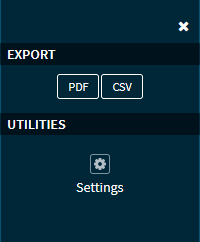
You can find the following individual elements:
|
Element |
Description |
|---|---|
|
|
Closes the menu. |
|
|
Click this button in the "Export" area to export the list as a PDF file. |
|
|
Click this button in the "Export" area to export the list as a CSV file. |
|
|
Click this icon in the "Tools" area to open the " Settings " dialogue window. |


