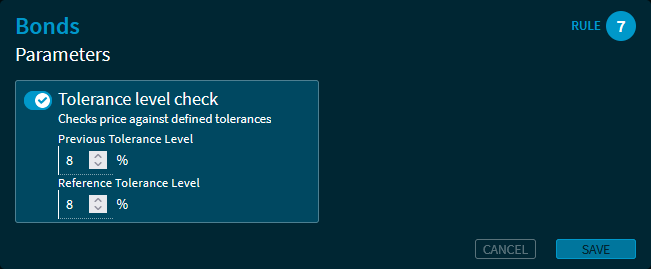
List of parameter rules in the "Price valuation (OTC)" area:
|
Rule |
Description |
|---|---|
|
Rule 1 |
Equity/FX options |
|
Rule 2 |
CDS |
|
Rule 3 |
Interest rate swap |
|
Rule 4 |
Bond option |
|
Rule 5 |
CDS option |
|
Rule 6 |
FX forwards |
|
Rule 7 |
Bonds |
|
Rule 8 |
Mortgage bonds |
|
Rule 9 |
Rev. convertible bonds |
|
Rule 10 |
Promissory note loans |
List of parameters:
|
Parameter |
Description |
|---|---|
|
First price check
|
[Parameter currently not editable] Show flag (FP) in report if instruments are valuated for the first time. |
|
Negative price check
|
[Parameter currently not editable] Show flag (NP) in report where a negative valuation price was selected. |
|
Zero price check
|
[Parameter currently not editable] Show flag (ZP) in report where a zero price was selected for valuation. |
|
Check: Tolerance level |
Enable this setting if you want to check the tolerance levels and then enter the maximum permissible percentage tolerance values to reference and previous day's rates for the respective rule. For the different security types and rules, the following default settings are pre-set, which you can overwrite as an administrator:
The maximum possible input value here is 999%. |
|
Reference Price Spread in % |
[Parameter editable] Enable this setting, if you like to define the permitted price deviation from the provided reference price. |